You can find and turn unlinked brand mentions into backlinks by using Google search operators or tools like Ahrefs to locate text-only citations. Then, filter for high-quality websites, identify the author’s contact details, and send a friendly outreach email asking them to add your link.
Key Takeaways
- Use Google search operators, Google Alerts, or automated tools like Ahrefs or SEMrush to find and audit brand mentions easily.
- Contact the specific author with a blogger outreach email asking them to add the link.
- Always prioritize high authority websites and ensure the mention has a positive sentiment.
In this Uprankly guide, we will share step-by-step processes to identify these mentions and turn them into authoritative backlinks that boost your rankings. You will also find a downloadable spreadsheet named “Unlinked Brand Mentions Checker” to streamline the process.
What are Unlinked Mentions?
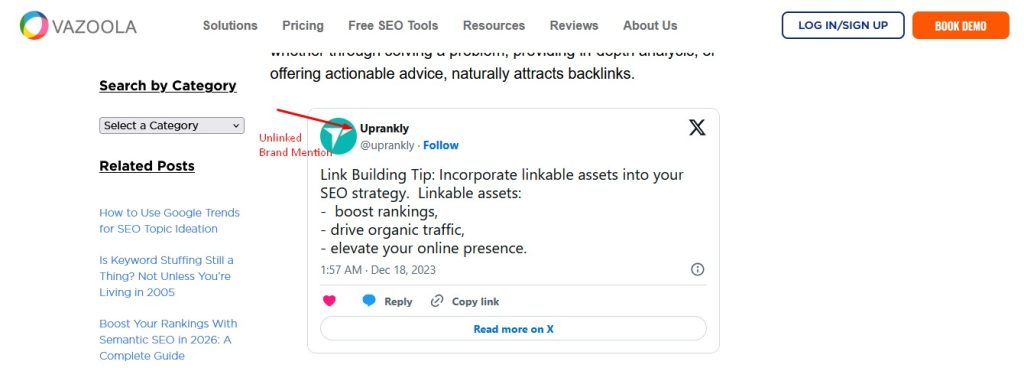
Unlinked mentions mean when another website cites your brand name or product in their text without providing a clickable hyperlink connecting back to your specific webpage.
While these citations prove your brand is being discussed, they fail to pass direct authority or traffic to your site.
Search engines like Google Search can identify your brand name in the text, but they do not assign the same ranking power to plain text as they do to active hyperlinks.
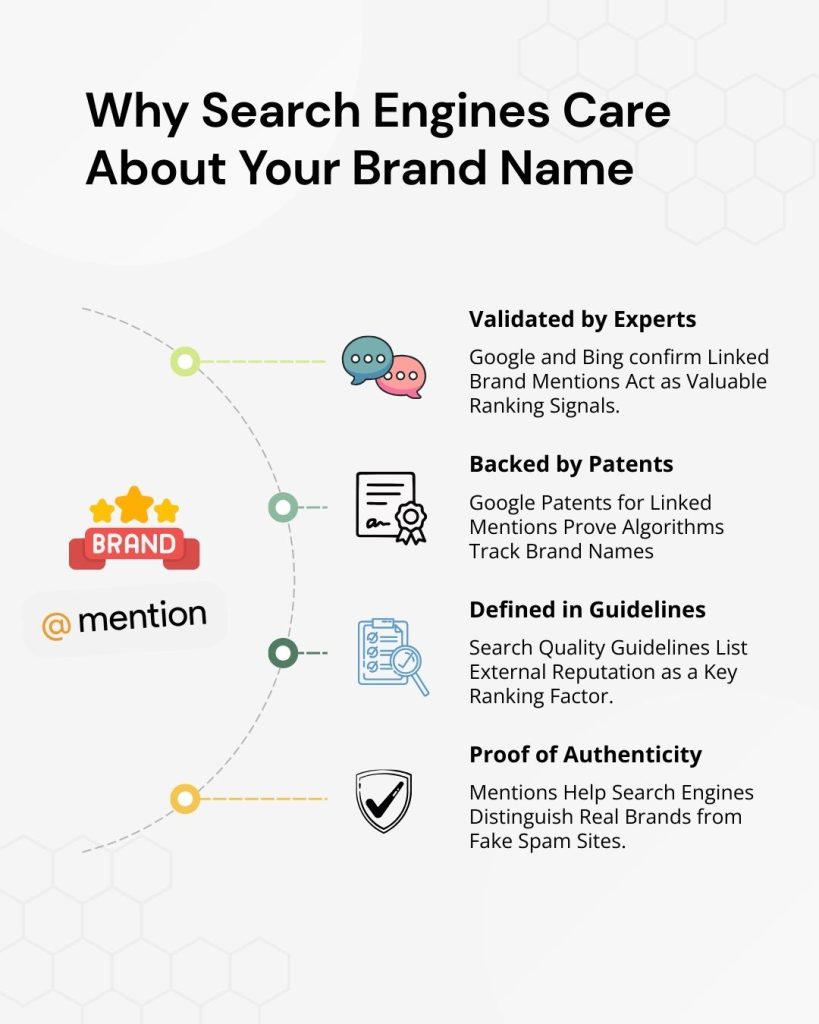
Converting these mentions is a highly effective form of content optimization because the hard work of getting mentioned is already done; you need to ask for the connection.
These mentions can appear anywhere, from high-authority news outlets and industry blogs to various social media sites. While mentions on social platforms often do not impact SEO directly due to platform restrictions, unlinked citations on editorial websites represent “low-hanging fruit” for building authority.
Unlinked Brand Mentions Types
- Brand Name: Direct citations of your company name within the body text of an article.
- Product Mentions: Specific references to your proprietary goods or services without a direct product link.
- Executive Mentions: Quotes or references citing your CEO, founders, or key spokespeople without linking.
- Image Sources: Use of your original infographics, charts, or logos without an attribution link.
- Misspelled Mentions: Variations or typographical errors of your brand name that usually go undetected.
- Proprietary Data: References to your original research, statistics, or reports without citing the source.
How to Find & Turn Unlinked Brand Mentions into Backlinks
You will need to find the mentions using search tools, filter by authority, find contact details, and send a friendly email asking authors to turn text into a clickable link.
Step 1: Find Your Brand Mentions
You cannot turn a mention into a link if you do not know it exists. In this step, we will look at four different ways to find websites that are talking about you.
Method 1: Google Search Operators (Free Method)
This is the manual way to find mentions using a search engine. It is free and very effective if you use specific commands to filter out the noise.
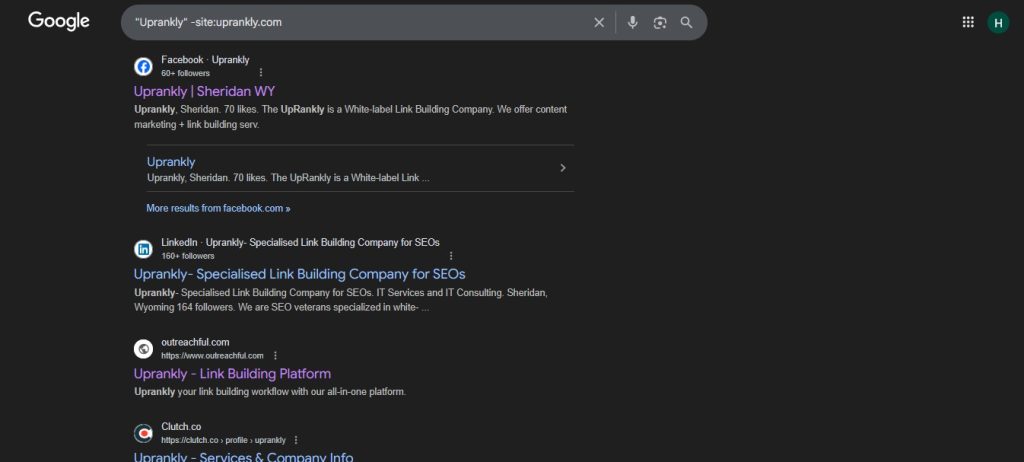
1. Search for your brand, but exclude your own site
Go to the search engine and type your brand name inside quotation marks. Then, add a special command to tell the search engine to ignore your own website. If you don’t do this, the results will be your own pages.
- Type this: “Brand Name” -site:yourdomain.com
2. Remove social media clutter
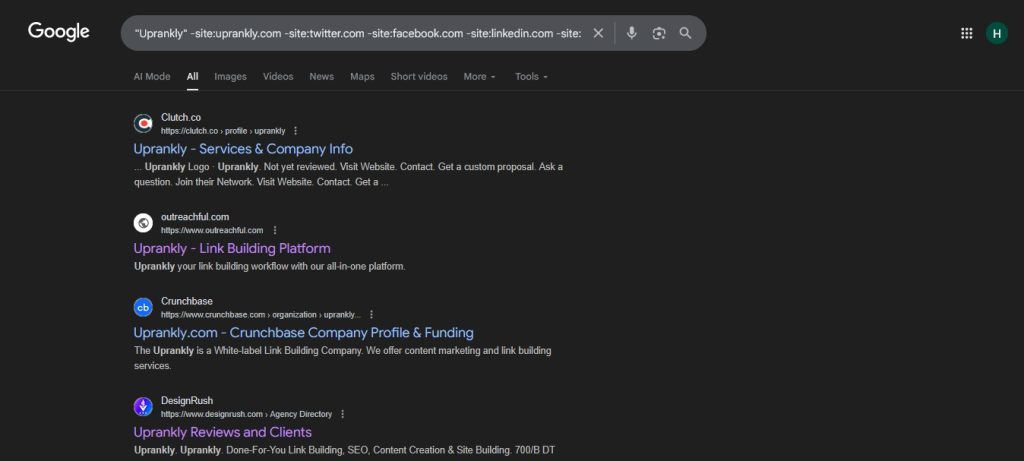
You likely don’t want to see every time someone tweets about you or mentions you on Facebook, as these links usually don’t help your SEO. You can extend the command to hide social media sites.
- Type this: “Brand Name” -site:yourdomain.com -site:twitter.com -site:facebook.com -site:linkedin.com -site:instagram.com
3. Search specifically for blogs and news
To find high-quality articles, you can tell the search engine to look only for blog posts or news stories. These are the best places to get backlinks.
- Type this: “Brand Name” inurl:blog -site:yourdomain.com
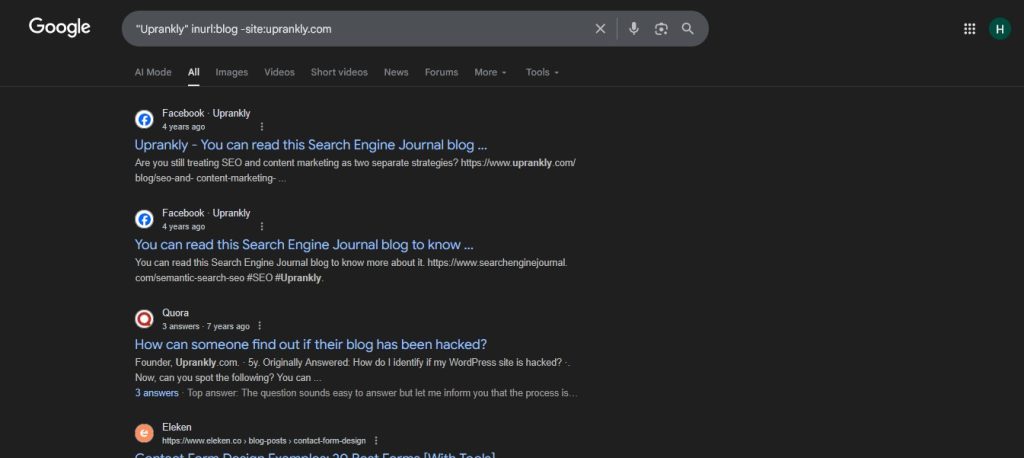
4. Check if the mention is unlinked
The search engine will show you the text, but it won’t tell you if there is a link. You have to check manually.
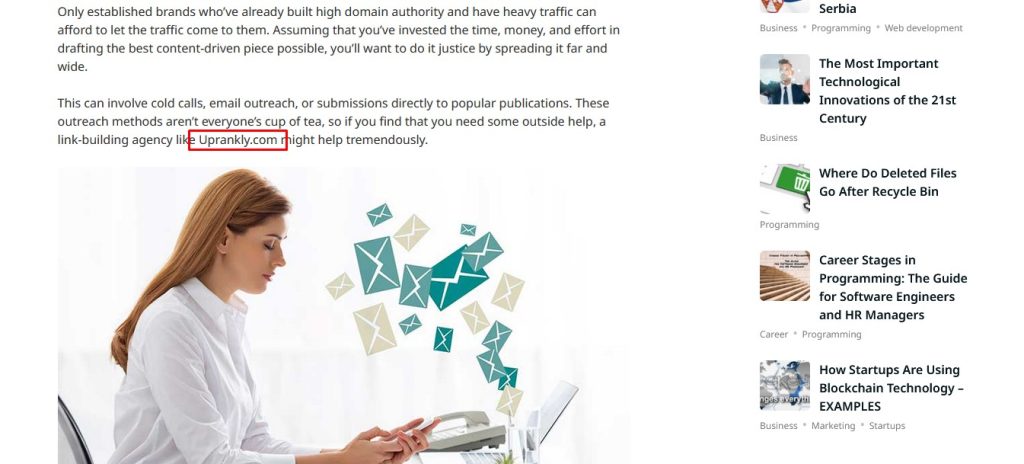
- Click on a search result to open the article.
- Press Ctrl + F (or Command + F on a Mac) to open the finder box.
- Type your brand name.
- Look at the highlighted text. If it is plain text and you cannot click on it, you have found one of your Unlinked mentions.
Method 2: Using Tools
Google Alerts (Free)
This method does the same work as Method 1, but it runs automatically. Instead of searching every day, Google will send you an email whenever it finds something new.
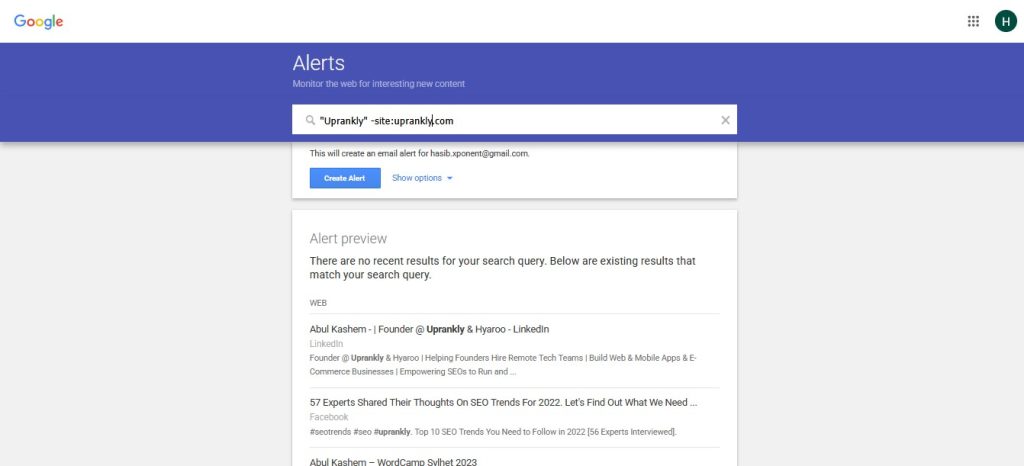
1. Create the alert
Go to the Google Alerts page. In the search box, type the same command we used above. It is essential to exclude your own site so you don’t get emails about your own posts.
- Type this: “Brand Name” -site:yourdomain.com
Adjust the settings
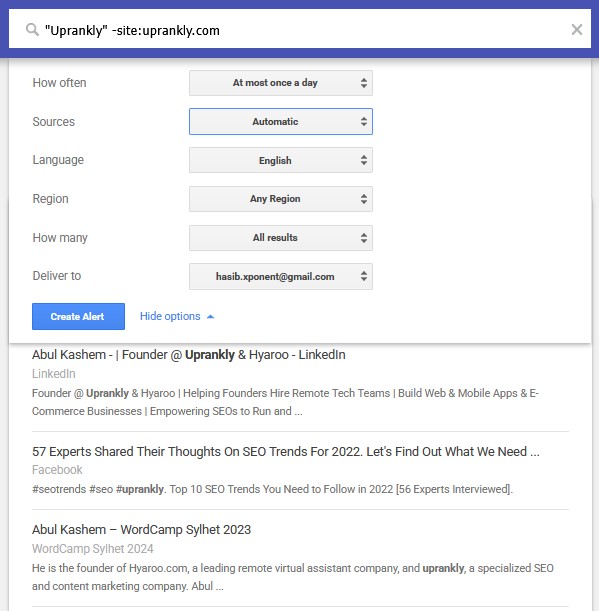
Click the “Show options” button to make sure you get good results.
- Sources: Change this to “Blog,” “News,” and “Web.” This keeps your inbox clean.
- Region: Select the country where your customers are located.
- How Many: Choose “All results” so you don’t miss anything.
2. Verify the Mention
When you get an email alert, click the link to read the article. Just like in Method 1, use Ctrl + F to search the page and confirm if they forgot to link to you. If there is no link, add it to your list of Unlinked mentions.
Ahrefs Content Explorer (Paid)
Ahrefs Content Explorer is a database tool that is more powerful than a standard search engine. It can filter results to show you exactly which pages are missing links without you having to check manually.
1. Enter your search
Open Content Explorer and type your brand name into the search bar. You can choose to search “In content,” which searches the entire text of articles to find where you were mentioned.
2. Use the special “Highlight unlinked domains” feature
Content Explorer has a specific filter designed for this exact job.
- Find the setting that says “Highlight unlinked domains.”
- Type in your website address (e.g., yourdomain.com).
- The tool will now look through all the articles that mention your brand name. It will highlight the ones that do not link to the website you entered.
3. Filter for quality
You can use filters to ignore low-quality websites. Set the “Domain Rating” filter to 30 or higher. This ensures you only see Unlinked mentions from websites that are authoritative and worth your time.
4. Export the list
Once you have your results, you can download them all at once. As a result, you will have a ready-made list of unlinked mentions to work with.
SEMrush Brand Monitoring (Paid)
SEMrush has a specific off-page seo tool called “Brand Monitoring” that keeps track of what people say about your business online.
1. Set up a project
Go to the Brand Monitoring section and create a new project. Enter your brand name as the keyword you want to track.
2. Exclude your site
In the settings, make sure to add your own domain to the “Blacklist” or “Exclude” section. It prevents the tool from counting links on your own website.
3. Select the “No Link” filter
After the tool searches the web, it will show you a dashboard of results. Look for the filter option that discusses links.
- Select “Unlinked” or “No Link.”
- The tool will instantly hide any articles that already link to you.
- What remains is a clean list of Unlinked mentions.
4. Sort by authority
Sort the list by “Authority Score.” This puts the most essential and powerful websites at the top of the list, so you can prioritize contacting them first.
Step 02: Organize Unlinked Brand Mentions
Once you have finished Step 1, you will likely have a long, messy list of websites that have mentioned you.
You cannot reach out to everyone. Some websites are low quality, and some might have negative reviews that you do not want to highlight.
In this step, we will organize your findings into a clean list and prioritize them. Thus, you can spend your time chasing the links that will actually help your SEO.
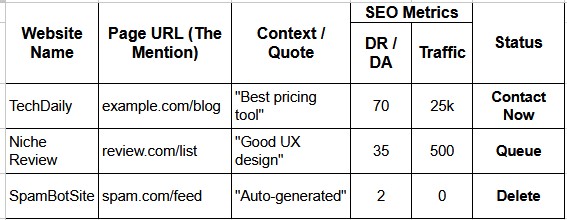
1. Create a Master Spreadsheet
To keep everything organized, you need a central place to store your data. Open Excel or Google Sheets and create a new document. You should set up specific columns to track the information you found in the previous step.
Columns to include
- Website Name
- Page URL
- Context
- Metrics
- Status
The spreadsheet will look like the image below once you create it.
2. Check the Website Authority
Not all backlinks are equal. A link from a major news site is worth far more than a link from a brand-new blog with no readers. You need to measure the “power” of the website.
| Metric / Factor | Why It Matters | Action to Take |
| Domain Rating (DR) | Predicts website influence and strength. | Prioritize scores of thirty plus. |
| Domain Authority (DA) | Indicates trust from search engines. | Avoid sites scoring under five. |
| Organic Traffic | Ensures real people visit the site. | Delete sites having zero traffic. |
| Spam Check | Avoids association with bad neighborhoods. | Reject gambling or adult content. |
| Competitor Links | Shows willingness to link industry. | Target sites linking to competitors. |
3. Verify the Mention and URL
Before you finalize your list, you must double-check the details. Automated tools can sometimes make mistakes.
Action
- Click the link: Open the website URL in your browser.
- Check the link status: Confirm one last time that the mention is truly unlinked. Sometimes, the author links your brand name to your social media profile instead of your website. If they are linked to your Twitter or LinkedIn, you can still reach out and ask them to change it to your website.
- Check the Sentiment: Read the paragraph where your brand appears. Is it positive? If they are criticizing your product or leaving a bad review, do not ask for a link. You do not want to drive more traffic to a negative article.
4. Prioritize Your Outreach List
Now that your spreadsheet is full of data, sort the list to decide who to contact first.
By organizing your list this way, you ensure that you spend your energy on the opportunities that will provide the biggest boost to your SEO.
The spreadsheet will be like the below once you create it.
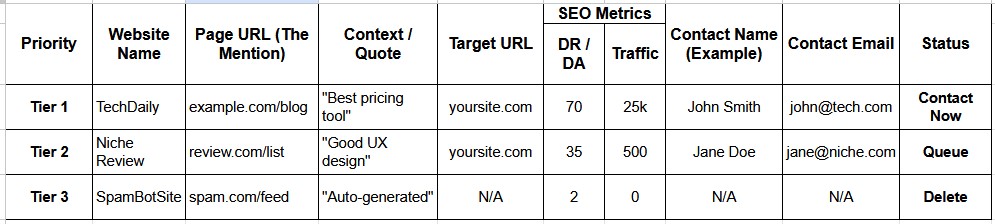
You can download the spreadsheet to track Unlinked Brand Mentions Spreadsheet and Use the spreadsheet with your researched data and streamline the process.
Step 03: Identify the Email Address
Now that you have a prioritized list of websites, you might be tempted to send an email to the generic “contact@” or “info@ “address listed in the footer. Do not do this.
Generic inboxes are usually managed by support staff or assistants who do not have the power to update articles. If you send your request there, it will likely be deleted.
For your link-building campaigns to be successful, you must find the specific person responsible for the content.
In this step, we will use a mix of detective work and tools to find the personal email addresses of the writers and editors.
1. Identify the Right Person to Contact
Before you look for an email, you need to know whose email you are looking for. Sending your message to the right person is a critical part of a smart SEO strategy.
- The Author: This is your best target. They wrote the article, they know your brand, and they usually can make quick edits.
- The Editor / Content Manager: If the author is a freelancer or a guest writer, they might not have access to the website anymore. In this case, you need to find the “Managing Editor” or “Head of Content.”
- The Webmaster: This is the person who handles the technical side of the site. They are a good backup option if you cannot find an editorial contact.
2. Check the Website Manually
Often, the contact details you need are hiding in plain sight. Before using fancy tools, take a minute to look around the website itself.
Where to look:
- Author Bio: Scroll to the bottom of the article. Many authors include a short biography that links to their personal website or lists their email address.
- “About Us” or “Team” Page: extensive publications often list their editorial staff. Look for names with titles like “Editor,” “Content Lead,” or “Senior Writer.”
- “Write for Us” Page: Even if you don’t want to write for them, these pages often list the email address of the editor who manages content submissions. This is exactly the person who can add your link.
- Privacy Policy: This is a secret trick. Scroll down to the Privacy Policy page. Legally, websites often have to list a specific administrative contact email there.
3. Use Social Media for Discovery
If the website doesn’t list the email, social media is your next best option. Writers and journalists often live on platforms like Twitter (X) and LinkedIn.
How to Use LinkedIn for Email Discovery
- Go to LinkedIn and search for the company name.
- Click on the “People” tab.
- Search for titles like “Content Manager,” “Editor,” or “SEO Specialist.”
- Once you find the person, check their “Contact Info” section. Many professionals list their email addresses there so people can pitch them ideas.
How to Use Twitter (X) for Email Discovery
- Find the author’s profile.
- Read their bio. Journalists frequently put their email in their bio (e.g., “name at company dot com”) to avoid spam bots while still being accessible.
- Check their pinned tweet. Sometimes they link to a personal portfolio that contains their contact details.
4. Use Email Discovery Tools
If manual searching doesn’t work, there are software tools like Hunter.io explicitly designed to find email addresses associated with a domain. These tools scan the web for patterns to guess the correct email.
Using these tools saves time and ensures your link-building campaigns have a lower bounce rate (meaning fewer emails get rejected by the server).
By taking the time to find the correct email addresses, you ensure your request lands in the inbox of a human who can actually say “yes,” significantly improving the results of your effective SEO strategy.
Step 04: Reach Out to the Author
You have found the mention, organized the data, and hunted down the correct contact information. Now comes the most critical part: the email outreach.
This is where many people fail because they send robotic, demanding emails. Successful blogger outreach is about building a relationship, not just demanding a favor.
You need to write a message that is polite, personalized, and easy for the author to say “yes” to.
1. Crafting the Subject Line
The subject line is the gatekeeper. If it looks boring or spammy, your email will never be opened. You need a subject line that is friendly and indicates you are a real person, not a bot.
Best Practices
- Be Specific: Mention their article title or your brand name so they know exactly what the email is about.
- Be Polite: A simple “Thank you” goes a long way.
Examples:
- “Question about your article on [Topic]”
- “Thanks for mentioning [Brand Name]!”
- “Quick note regarding your post: [Article Title].”
2. Personalizing the Email Pitch
The body of your email must prove that you actually read their content. If you use a generic script that says, “Dear Webmaster, I love your blog,” they will delete it immediately. Effective seo outreach requires a personal touch.
How to Personalize:
- Use their name: Never use “To whom it may concern.” Always use “Hi [First Name].”
- The “Hook”: In the first sentence, mention something specific they wrote. Compliment a specific tip, a quote, or an image they used. This proves you are a human reader.
- The Context: clearly state where they mentioned your brand. Don’t make them guess.
3. The “Ask” and the Value Proposition
When you ask for the link, you must frame it as a benefit to their readers, not just a benefit to you. This is the core of your email pitch.
The Wrong Way:
“Please link to my site because I need higher rankings.” (The author does not care about your rankings.)
The Right Way:
“I noticed you mentioned [Brand Name], but didn’t link to us. It might be helpful for your readers to have a direct link so they can easily find the resource/product you are talking about.”
By framing it as “improving user experience,” you are helping the author make their article better.
4. Using Outreach Templates
To save time, you can use a template structure, but you must fill in the blanks with unique information for every single email. Here is a proven structure for your outreach templates:
The Template:
Subject: Thanks for the Mention [Brand Name] on [Topic]!
Hi [Author Name],
I was reading your article, [Article Title], and I really enjoyed your point about [Specific Detail from article]. It was a great read.
I noticed you mentioned [Your Brand Name] in the section about [Topic]. Thank you so much for the shout-out!
I saw that there isn’t a link back to our site yet.
If you have a moment, would you mind adding a link?
It would help your readers find the [Product/Report] you referred to without them having to search for it manually.
Here is the link to use: [Your URL]
Thanks again for the great content!
Warm Regards,
[Your Name]
If you found hundreds of unlinked mentions in Step 1, sending every email manually might take weeks. This is where a link building automation tool becomes useful.
Tools like Pitchbox or BuzzStream allow you to upload your spreadsheet from Step 2 and send emails in bulk.
Use the tools mentioned above to schedule emails, but keep the content personalized.
Step 05: Track and Follow Up
Sending the first email is only half the battle. People are busy, inboxes are overflowing, and emails often get buried. If you do not have a system to track your progress and follow up with authors, you are leaving valuable backlinks on the table.
In this final step, we will discuss how to manage your outreach effectively and why securing these links is crucial for your long-term brand visibility.
1. Track Your Outreach Status
You need to know exactly where you stand with every website on your list. If you don’t track this, you might accidentally annoy an editor by emailing them twice, or you might forget to reply to someone who said “yes.”
2. Update Your Spreadsheet
Go back to the master spreadsheet you created in Step 2 and update the “Status” column for every person you contacted. Common statuses include:
- Sent: You sent the first email.
- Opened: The author opened the email (if you are using tracking software).
- Replied: They responded to you.
- Link Live: They added the link.
- Rejected: They said no.
Keeping this organized ensures you look professional and helps you measure the success rate of your campaign.
3. The Follow-Up Rule
A lack of response does not mean “no.” It usually just means “I’m busy.” A polite reminder brings your email back to the top of their inbox. However, there is a fine line between being helpful and being annoying.
- The “3-Day” Rule
Wait at least 3 to 5 business days before sending your first follow-up. Do not email them the next day. Give them time to breathe.
- The “Two-Strike” Limit
If they do not reply to your first email, send a follow-up. If they do not reply to that one, send one final short message. If there is still no response, stop. Sending more than two follow-ups can damage your reputation and make you look like a spammer.
4. Writing the Follow-Up Email
Your follow-up should not be a copy of the first email. It should be incredibly short and casual. You do not need to pitch them again; remind them.
Example
Hi [Name],
I just wanted to bump this to the top of your inbox in case you missed my previous note.
Thanks again for the mention!”
This low-pressure approach is often what gets the reply. Once they reply, be quick to provide any information they need.
What are the Limitations of Unlinked Brand Mentions?
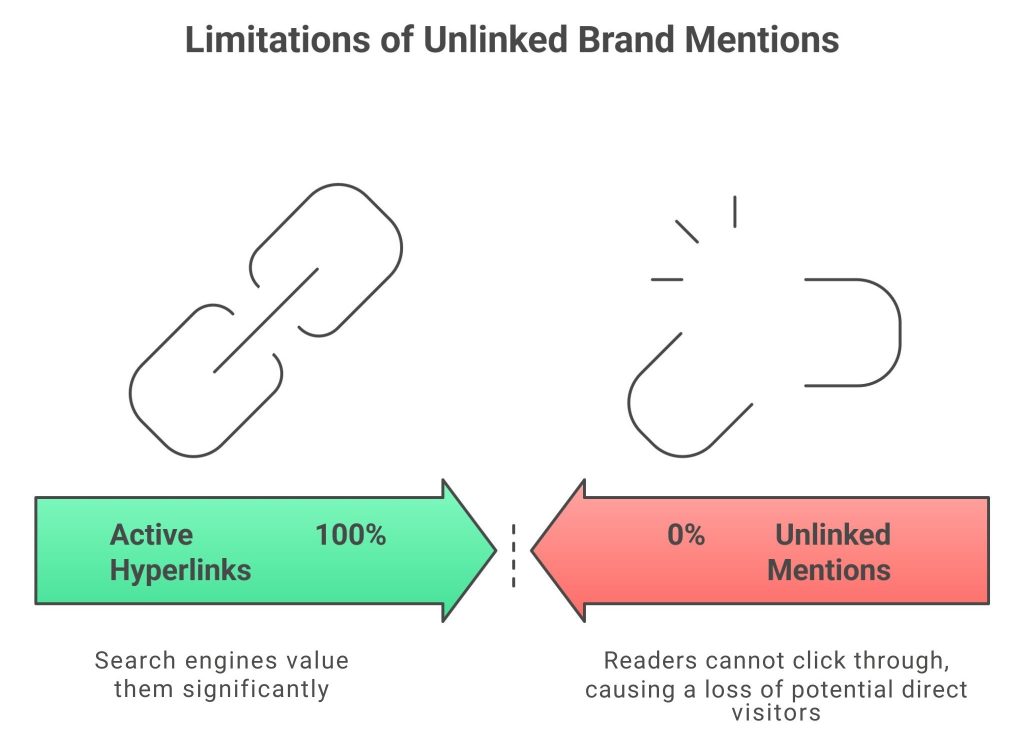
The limitations of unlinked brand mentions are that they do not pass SEO authority, prevent readers from clicking through to your site, and generate significantly less traffic than active hyperlinks.
Here are six limitations of unlinked brand mentions:
- No Direct Authority: They do not pass link equity or PageRank to your website.
- Reduced User Traffic: Readers cannot click through, causing a loss of potential direct visitors.
- Tracking Challenges: It is difficult to measure the direct impact on sales or conversions.
- Lower SEO Impact: Search engines value them significantly less than actual do-follow hyperlinks.
- High User Friction: Users must manually search for your brand, significantly lowering engagement rates.
- Missed Conversions: Potential customers cannot easily land on your product pages to purchase.
FAQ
When using unlinked mentions to build links, what do you look for?
You are actively searching for existing text references of your brand, products, or services on other websites that do not currently contain a clickable hyperlink connecting readers back to your own website.
What is the difference between unlinked brand mentions and NoFollow links?
Unlinked mentions are plain text with no clickability whatsoever. NoFollow links are functional, clickable hyperlinks, but they contain a specific code tag instructing search engines not to pass authority to your site.
When Should I Not Convert Unlinked Mentions?
You should avoid requesting links from websites that are spammy, have very low authority, or contain negative sentiment about your brand. Connecting to bad neighborhoods or critical reviews can damage your reputation.
Why Are Unlinked Brand Mentions Problematic?
They are problematic because they fail to pass authority to your site and block user navigation. Without a direct link, interested readers cannot easily visit your website, causing you to lose valuable traffic.
Should I use different tools to find unlinked brand mentions to turn into a Backlink?
Yes, using multiple tools is best. Google Alerts catches new mentions instantly, while database tools like Ahrefs find older citations. Combining them ensures you catch every possible opportunity to build a valuable backlink.
Sum Up
Unlinked brand mentions = opportunity loss. The hardest part of SEO is getting people to talk about you, and you have already achieved that.
You do not need to convince a stranger to trust you; you need to ask them to make the connection. By sending a simple, friendly email, you can turn these missed chances into powerful links. This is the smartest way to improve your website using the work you have already done.