Pitchbox ($300/mo) is the veteran outreach platform with Ahrefs and Semrush integrations. Respona ($100/mo) takes an AI-first approach to pitch personalization and live prospect discovery. Uprankly Link Builder (starting price $37/mo) provides a 70,000-site prospect database, a client portal, and unlimited team seats on every plan.
Pick Pitchbox if your team already pays for an SEO tool stack and needs advanced sequencing. Choose Respona if AI-written pitches and real-time prospect search are your priority. While, subscribe Uprankly Link Builder if you want the full pipeline from prospecting to reporting in one platform at the lowest price.
Quick Verdict
| Pitchbox | Respona | Uprankly Link Builder | |
|---|---|---|---|
| Best for | Enterprise teams with Ahrefs/Semrush | Solo link builders and content marketers | Agencies managing multiple clients |
| Starting price | $300/mo (Pro) | $100/mo (Starter) | $37/mo (Starter) |
| Prospect database | No (bring your own) | No (live SERP search) | 70,000+ pre-vetted sites included |
| Client portal | No | No | Yes (branded) |
| Team seats | 2 on Pro, unlimited on Advanced+ | Per-seat pricing | Unlimited on all plans |
| Email accounts | 2 (Pro), 6 (Advanced), 15 (Scale) | 2 (Starter), 5 (Pro) | Unlimited on all plans |
| AI pitch writing | Yes | Yes | Yes |
| Ahrefs/Semrush integration | Yes | No | No |
| Free trial | Demo only | 14-day free trial | $37 one-time starter pack |
Let’s read this comprehensive guide where I compared Pitchbox vs Respona vs Uprankly based on their core features, price, pros and cons.
Pitchbox, Respona and Uprankly Link Builder Pricing Comparison (August 2026)
Pricing drives most buying decisions here. All three tools use monthly billing with annual discounts available.
| Plan tier | Pitchbox | Respona | Uprankly Link Builder |
|---|---|---|---|
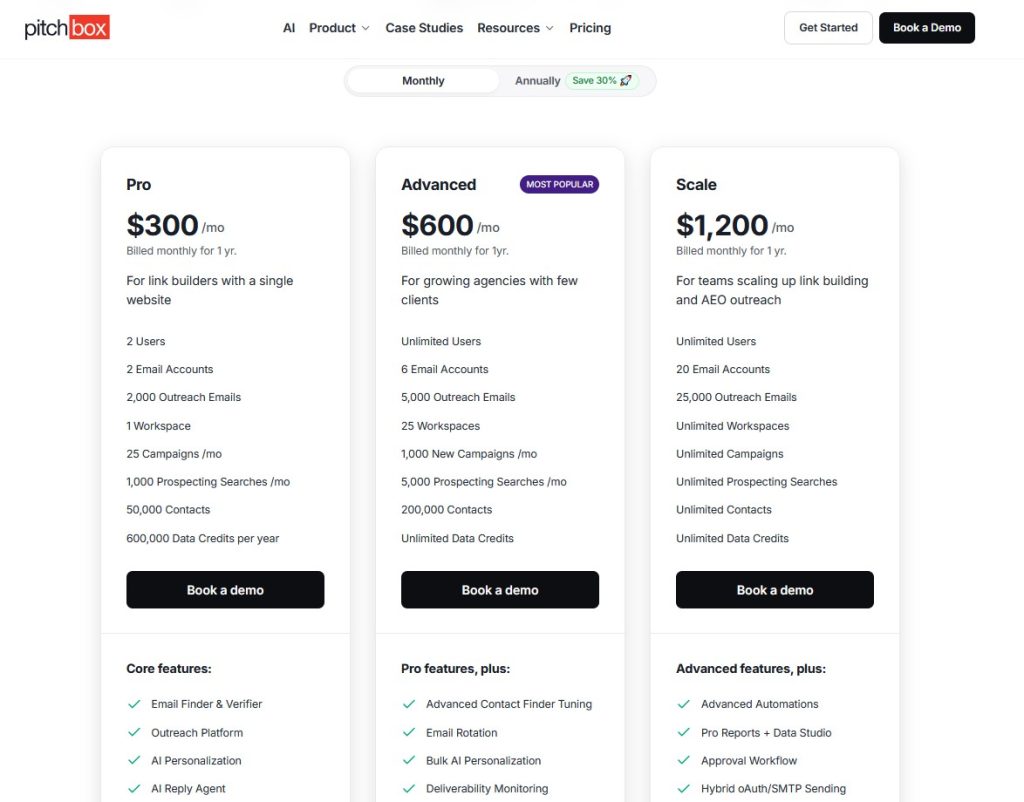
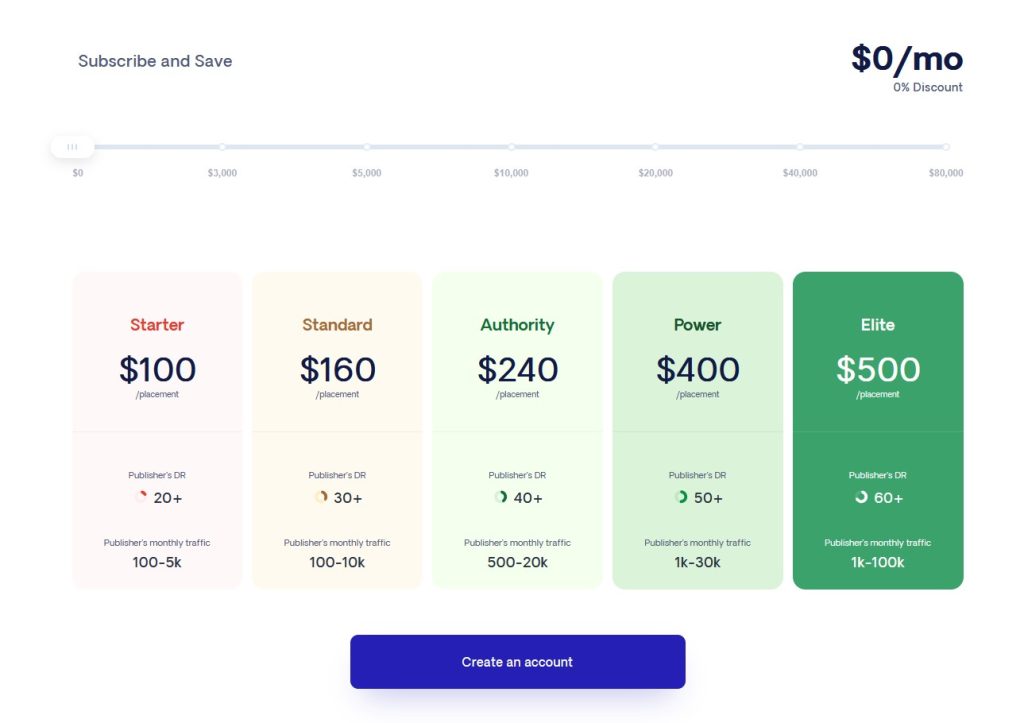
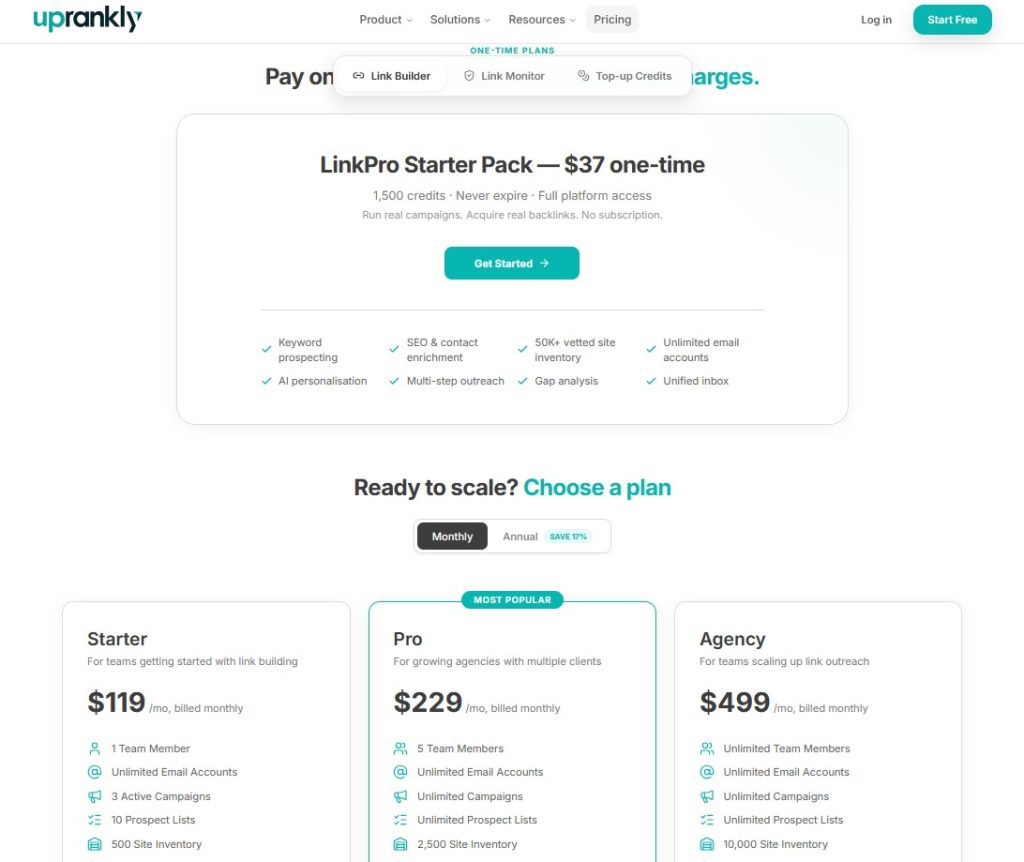
| Entry | $300/mo (Pro) | $100/mo (Starter) | $37/mo (One-time) |
| Mid | $600/mo (Advanced) | $160/mo (Standard) | $119/mo (Starter) |
| Top | $1200/mo (Scale) | $240/mo (Authority) | $229/mo (Pro) |
| Enterprise | Custom | $400 (Power$500 (Elite | $499/mo (Agency) |
What’s Included at Entry Level
Pitchbox doesn’t let you sign up on your own. You book a demo, talk to sales, and wait for access. That works for enterprise procurement teams. It’s a friction point for freelancers and small agencies.
Respona offers a 14-day free trial without a credit card. But the credit system means your effective cost is higher than the sticker price. Every contact lookup and email verification burns credits. On a 500-prospect campaign, those credits go fast.
Uprankly Link Builder charges a flat monthly fee. Contacts from the built-in database are included. No per-seat charges. No credit burns. You can test with a $37 starter pack before subscribing.
The table below shares the Pitchbox, Respona and Uprankly Link Buider offers for starting price.
| Pitchbox Starter | Respona Starter | Uprankly Link Builder Starter | |
|---|---|---|---|
| Users | 2 | 1 | Unlimited |
| Email accounts | 2 | 2 | Unlimited |
| Monthly emails | 2,000 | Based on credits | Based on plan credits |
| Prospect database | No | No | 70,000+ sites |
| Client portal | No | No | Yes |
| White-label reports | No | No | Yes |
| Inbox warm-up | No | No | No |
| Credit system | No | Yes (contacts cost credits) | No |
| Trial / entry | Demo required | 14-day free trial | $37 one-time pack |
For more pricing breakdowns, read our link building tools comparison.
Pitchbox vs Respona vs Uprankly Link Builder Feature Comparison by Category
Each tool takes a different approach to link building, from prospecting and outreach to tracking and client management.
Here’s how their core features compare.
Prospecting
Finding the right sites is the first step. Each tool approaches this differently.
Pitchbox gives you the flexibility if you already own Ahrefs or Semrush. It pulls prospect lists directly from those tools. You get access to millions of domains without leaving the platform.
The tradeoff: Ahrefs alone costs $99-449/mo on top of your Pitchbox bill.
Respona searches live Google results for your keywords and surfaces relevant pages in real time. That’s strong for content-led campaigns like guest posting and resource page outreach.
The downside: every contact lookup costs credits, and there’s no way to browse a pre-built list.
Uprankly Link Builder starts with a database. Open Link Builder, filter by niche and DR, and contacts are already there. You skip the research tool entirely.
The catch: 70,000 sites isn’t a full web index. Uncommon niches may have limited coverage, and you’ll need to import your own domains for those campaigns.
| Feature | Pitchbox | Respona | Uprankly Link Builder |
|---|---|---|---|
| Pre-vetted site database | No | No | Yes (70,000+ sites) |
| Live SERP-based prospect search | Yes | Yes | No |
| Keyword-based search | Yes | Yes | Yes |
| Ahrefs/Semrush integration | Yes | No | No |
| CSV import | Yes | No | Yes (with auto-enrichment) |
| SEO metrics filtering (DR, traffic) | Yes | Yes | Yes |
| Niche categorization | No | No | Yes |
| Built-in contact finder | Yes | Yes (credit-based) | Yes (included) |
| Contact verification | Yes | Yes (credit-based) | Yes (included) |
| Deduplication | Yes | No | Yes |
Outreach and Follow-ups
All three tools handle email sequencing. The differences are in the details.
Pitchbox has the most advanced sequencing engine. Conditional branching lets you send different follow-ups based on whether someone opened, clicked, or replied. If you run hundreds of campaigns with complex logic, Pitchbox handles that better than the other two.
Respona stands out on AI personalization. It reads each prospect’s page and drafts a custom opening line based on their actual content. That saves hours of manual research. It also has a podcast outreach mode which is useful if podcast guesting is part of your link strategy.
Uprankly Link Builder covers the core workflow like sequences, rotation, daily limits, auto-stop, and adds built-in inbox. New email accounts build sender reputation for 2-4 weeks before you launch full campaigns. Neither Pitchbox nor Respona includes warm-up. You’d need a separate tool like Lemwarm or Warmup Inbox for that.
| Feature | Pitchbox | Respona | Uprankly Link Builder |
|---|---|---|---|
| AI-powered pitch writing | Yes | Yes | Yes |
| Automated email sequences | Yes | Yes | Yes |
| Conditional branching | Yes (advanced) | No | No |
| Multi-step drips | Yes | Yes | Yes |
| Email rotation | Yes | Yes | Yes |
| Daily sending limits | Yes | Yes | Yes |
| Auto-stop on reply | Yes | Yes | Yes |
| Time-zone scheduling | Yes | Yes | Yes |
| Inbox warm-up | No | No | No |
| Podcast outreach mode | No | Yes | No |
Tracking and Link Verification
Getting a reply is step one. Confirming the link went live is where most tools drop the ball.
Pitchbox and Uprankly Link Builder both verify that placed links are live and catch redirects or removals. Respona tracks email performance but stops after the reply. It doesn’t confirm whether the link actually went up.
If link monitoring matters to your workflow, Uprankly’s Link Monitor watches acquired backlinks around the clock and alerts you when any drop. Pitchbox has similar built-in monitoring. Respona users need a third-party tool for this.
| Feature | Pitchbox | Respona | Uprankly Link Builder |
|---|---|---|---|
| Reply tracking | Yes | Yes | Yes |
| Link placement tracking | Yes | No | Yes |
| Link indexation check | Yes | No | Yes |
| 301/404/DNS error detection | Yes | No | Yes (via Link Monitor) |
| Pipeline status dashboard | Yes | Yes | Yes |
Client Management
Client management is where the three tools diverge the most and where agencies should pay close attention.
Neither Pitchbox nor Respona was built for client-facing work. Both expect you to manage approvals over email and build reports in spreadsheets or slide decks.
Uprankly Link Builder gives each client a branded dashboard. Clients review prospects, approve or reject domains, and pull reports without touching your workspace. White-label reporting comes standard on every plan not locked behind a $600/mo tier like Pitchbox.
For freelancers working solo, this section won’t matter much. For agencies billing 5-10 clients, it’s often the deciding factor.
| Feature | Pitchbox | Respona | Uprankly Link Builder |
|---|---|---|---|
| Client portal (branded) | No | No | Yes |
| Client domain approvals | No | No | Yes |
| White-label reports | No (Advanced+ only, $600/mo) | No | Yes (all plans) |
| Unlimited team seats | No (2 on Pro) | No (per-seat) | Yes (all plans) |
| Role-based access | Yes | No | Yes |
| Team activity tracking | Yes | No | Yes |
| Real-time client messaging | No | No | Yes |
Reporting
Pitchbox has solid internal reporting but locks white-label output behind its Advanced tier. Respona tracks opens, clicks, and replies but doesn’t generate client-facing reports. Uprankly Link Builder auto-generates branded reports that clients can access through their portal.
| Feature | Pitchbox | Respona | Uprankly Link Builder |
|---|---|---|---|
| Campaign dashboard | Yes | Yes | Yes |
| Email analytics | Yes | Yes | Yes |
| White-label PDF reports | Advanced+ only ($600/mo) | No | Yes (all plans) |
| Link delivery verification | Yes | No | Yes |
| Client-facing report sharing | No | No | Yes (via client portal) |
Pitchbox: Pros and Cons
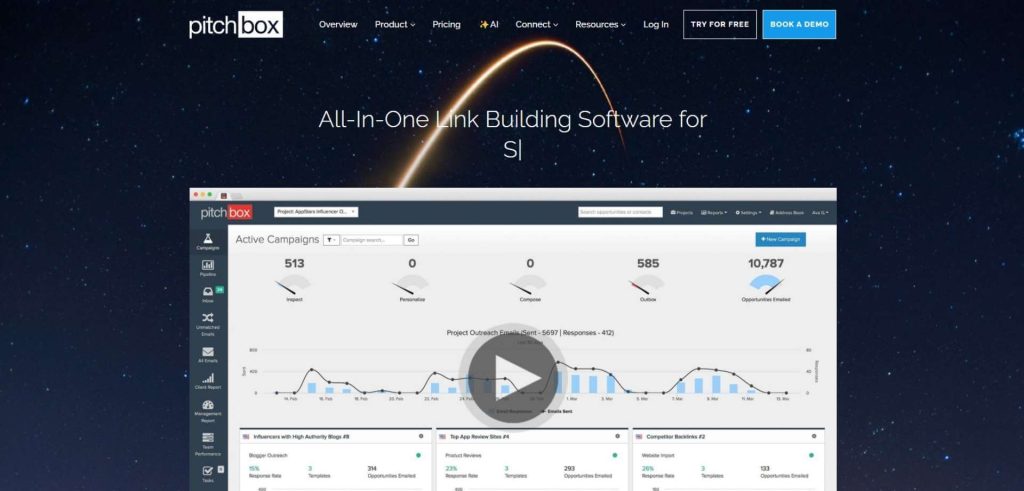
Pitchbox excels at advanced outreach, but its higher costs and limitations matter for smaller teams.
Pros
- Deep Ahrefs and Semrush integration: Pull prospects directly from your SEO tool stack. No exports, no manual imports.
- Advanced outreach sequencing: Conditional branching, multi-step drips, and campaign logic built for high-volume teams.
- Established platform (10+ years): Well-reviewed on G2 and Capterra. Mature product with enterprise case studies.
- Built-in link monitoring: Catches 301s, 404s, and DNS errors on placed backlinks.
Cons
- No prospect database: You need Ahrefs ($99-449/mo) or Semrush on top of Pitchbox to find sites.
- Pro plan caps at 2 users, 2 email accounts, 2,000 emails/mo: Small agencies outgrow this in weeks.
- No client portal or white-label reports on Pro: You need Advanced ($600/mo) for branded output.
- Demo required to get started: No self-serve signup. No free trial.
- No inbox warm-up: New email accounts need a separate warm-up tool.
Read our Uprankly Link Builder vs Pitchbox
Respona: Pros and Cons
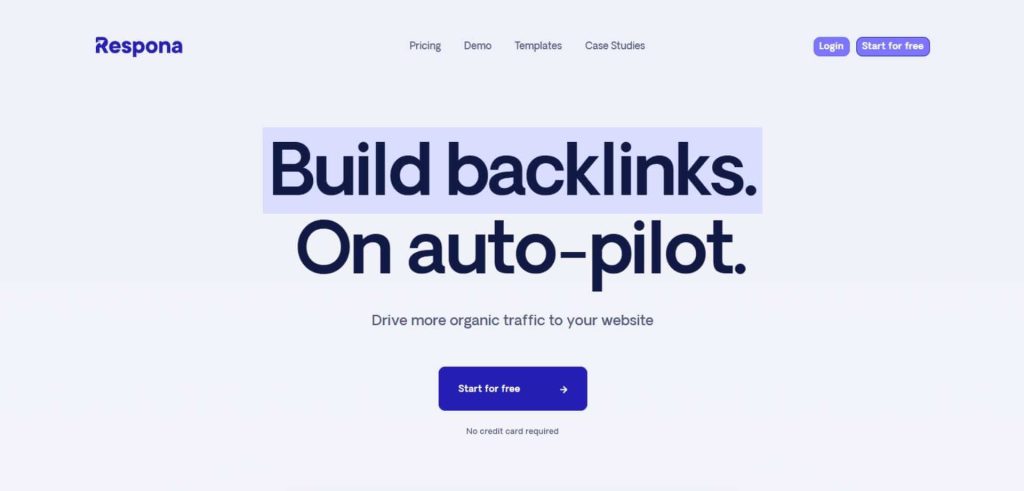
Respona combines AI personalization with live prospecting, but its credit system can become expensive.
Pros
- Strongest AI personalization: Reads each prospect’s page and drafts a custom opener. Saves hours of manual research.
- Live SERP prospecting: Search Google in real time to find relevant pages for your keywords.
- Podcast outreach features: Built-in support for finding and pitching podcast hosts.
- 14-day free trial: Test the platform without talking to sales.
Cons
- The credit system adds up fast: Contact finding and verification cost credits on top of your monthly fee. High-volume campaigns can double your effective spend.
- No client portal: Agencies manage approvals by email. No branded dashboards.
- Per-seat pricing: Adding team members increases your bill.
- No built-in prospect database: You search live or import. No pre-vetted inventory to browse.
- No link tracking after outreach: Respona doesn’t verify whether placed links stay live.
- No inbox warm-up: You need a third-party service.
- No white-label reporting: Reports carry Respona branding.
Read our Uprankly Link Builder vs Respona
Uprankly Link Builder: Pros and Cons
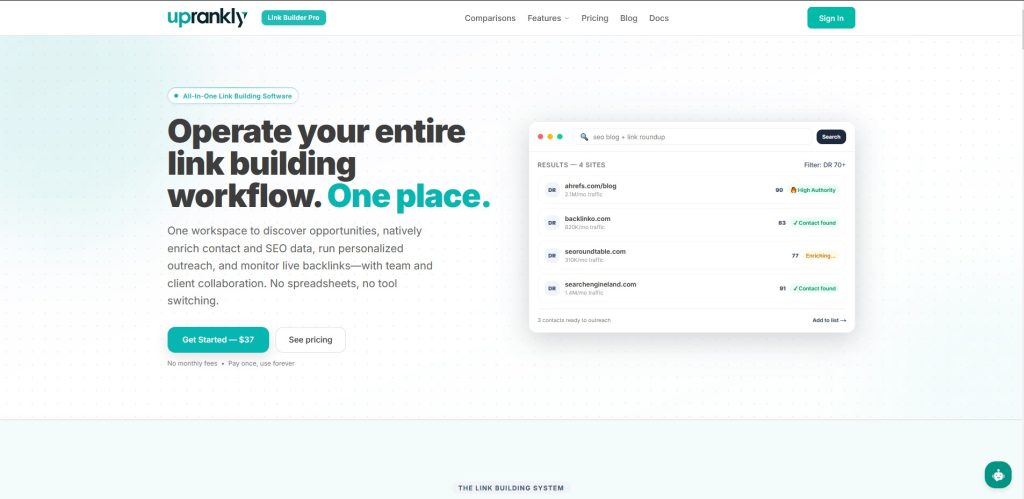
Uprankly brings the entire link-building workflow together, with a few tradeoffs around flexibility and coverage.
Pros
- Full pipeline in one platform: Prospecting, enrichment, outreach, tracking, client management, and reporting in a single login. No tool-switching.
- Lowest entry price: $119/mo with unlimited team seats and email accounts. Or $37 one-time to test.
- Built-in prospect database: 70,000+ pre-vetted sites with contacts attached. You skip the research tool.
- Client portal on every plan: Branded dashboards, domain approvals, and white-label reports from day one.
- Built-in inbox: Builds sender reputation before you launch.
Cons
- No Ahrefs/Semrush integration: You can’t pull prospect lists from those tools. CSV import is the workaround.
- Smaller prospect pool: 70,000 sites is strong for outreach, but niche industries may have gaps. You’ll import your own domains for uncommon verticals.
- Newer platform: Less review coverage on G2 and Capterra than Pitchbox. The product is deep, but the brand is still building trust.
- Sequencing is solid, not best-in-class: No conditional branching. Pitchbox’s logic engine is more advanced for complex enterprise workflows.
- No live SERP search: You can’t search Google results from inside the platform like Respona does.
Who Should Choose Pitchbox
Pitchbox is the strongest link building outreach tool of the three. But you’ll pay for it, both in the tool itself and in the SEO stack it depends on. For smaller operations, see our full list of Pitchbox alternatives.
Pick Pitchbox if:
- Your team already pays for Ahrefs or Semrush: Pitchbox plugs directly into those tools. If you’re already spending $200+/mo on SEO data, the integration saves real time on prospect research.
- You run hundreds of campaigns at scale: The conditional branching and multi-step sequencing handle complex workflows that simpler tools can’t match.
- Your clients never log in: If you manage everything internally and deliver results through your own reports, the missing client portal isn’t a problem.
- Brand trust matters to procurement: Pitchbox is a known name. Enterprise buyers who need vendor reviews, SOC compliance docs, and G2 presence will find them.
Who Should Choose Respona
Respona is a strong outreach tool for individuals. It falls short on team management, client workflows, and link verification. If you’re comparing more options, check our Respona alternatives roundup.
Pick Respona if:
- You’re a solo link builder or content marketer: Respona’s workflow fits individual operators who don’t need client management features.
- Your outreach is content-led: Guest posting, resource page outreach, podcast pitching, Respona’s live SERP search finds these opportunities faster than a static database.
- AI personalization is your top priority: Respona’s page-reading AI writes better opening lines than most tools. For high-value, one-at-a-time pitches, that quality pays for itself.
- You want to try before you buy: The 14-day free trial lets you test core features without a sales call.
Who Should Choose Uprankly Link Builder
For teams that also need backlink monitoring, Link Monitor watches your links around the clock and alerts you when any drop. To build a strategy before you start outreach, Link Planner runs competitor gap analysis and generates a free link building plan.
Pick Uprankly Link Builder if:
- You run an agency with multiple clients: The client portal, white-label reports, and unlimited team seats are included from the Starter plan. No add-ons, no tier upgrades needed.
- You want predictable costs: No per-seat charges. No email account limits. No credit-based contact lookups. Your bill stays flat every month.
- You need the full workflow in one platform: Prospect discovery, contact enrichment, email sequencing, reply tracking, link verification, and client reporting, all in Link Builder.
- Your budget is under $200/mo: Uprankly’s Starter ($119/mo) includes more features at entry level than either Pitchbox Pro or Respona Starter.
- You’re a freelancer testing the waters: The $37 starter pack gives full access with no recurring commitment.
The Bottom Line
If you already pay for Ahrefs and need enterprise-grade sequencing, Pitchbox earns its price. If you’re a solo operator who values AI pitch quality above all else, Respona fits. If you’re an agency that wants prospecting through reporting in one login without surprises on the invoice, start with Uprankly.
Three tools, three different strengths:
| Need | Best pick |
|---|---|
| Advanced sequencing + Ahrefs integration | Pitchbox |
| AI-personalized pitches + live SERP search | Respona |
| Full pipeline + client portal + lowest cost | Uprankly Link Builder |
FAQ: Pitchbox vs Respona vs Uprankly Link Builder
Can I switch from Pitchbox or Respona to Uprankly Link Builder without losing data?
Yes. Export your prospect lists as CSV files and import them into Uprankly Link Builder. The platform auto-enriches imported domains with DR, traffic, and contact data. Recreate your email templates in the template library and you’re running within a day.
Which tool has the best deliverability?
Uprankly Link Builder is the only one with a built-in inbox. Both Pitchbox and Respona require third-party warm-up tools like Lemwarm or Warmup Inbox. All three support email rotation and daily sending limits. Deliverability depends more on your inbox setup and sending patterns than the platform itself.
Is Respona’s credit system expensive?
It depends on volume. Respona charges credits for contact finding and email verification on top of the monthly fee. A single campaign targeting 500 prospects can burn through a large chunk of your monthly credit allotment. Low-volume users won’t notice it much. High-volume agencies feel it fast.
Does Pitchbox offer a free trial?
No. Pitchbox requires a demo call before granting access. There’s no self-serve signup or trial period. Respona offers a 14-day free trial. Uprankly Link Builder offers a $37 one-time starter pack with full platform access.
Which tool is best for a 2-3 person agency?
Uprankly Link Builder. Pitchbox Pro caps you at 2 users and 2 email accounts, you’ll outgrow it fast. Respona charges per seat. Uprankly Link Builder includes unlimited users and unlimited email accounts on every plan, starting at $119/mo.
Do any of these tools include a prospect database?
Only Uprankly Link Builder. It ships with a 70,000+ site database with contacts already attached. Pitchbox and Respona both require you to bring prospects from external tools (Ahrefs, Semrush) or find them through in-app search. Uprankly Link Builder database doesn’t cover the entire web, but it’s enough to launch campaigns on day one without extra subscriptions.
Can I use Pitchbox without Ahrefs?
Yes, but you lose its biggest advantage. Pitchbox’s strength is the deep Ahrefs/Semrush integration. Without it, you’re limited to keyword-based Google scraping and CSV imports features the other two tools also offer. If you don’t have an SEO tool stack, Pitchbox becomes harder to justify at $300/mo.
